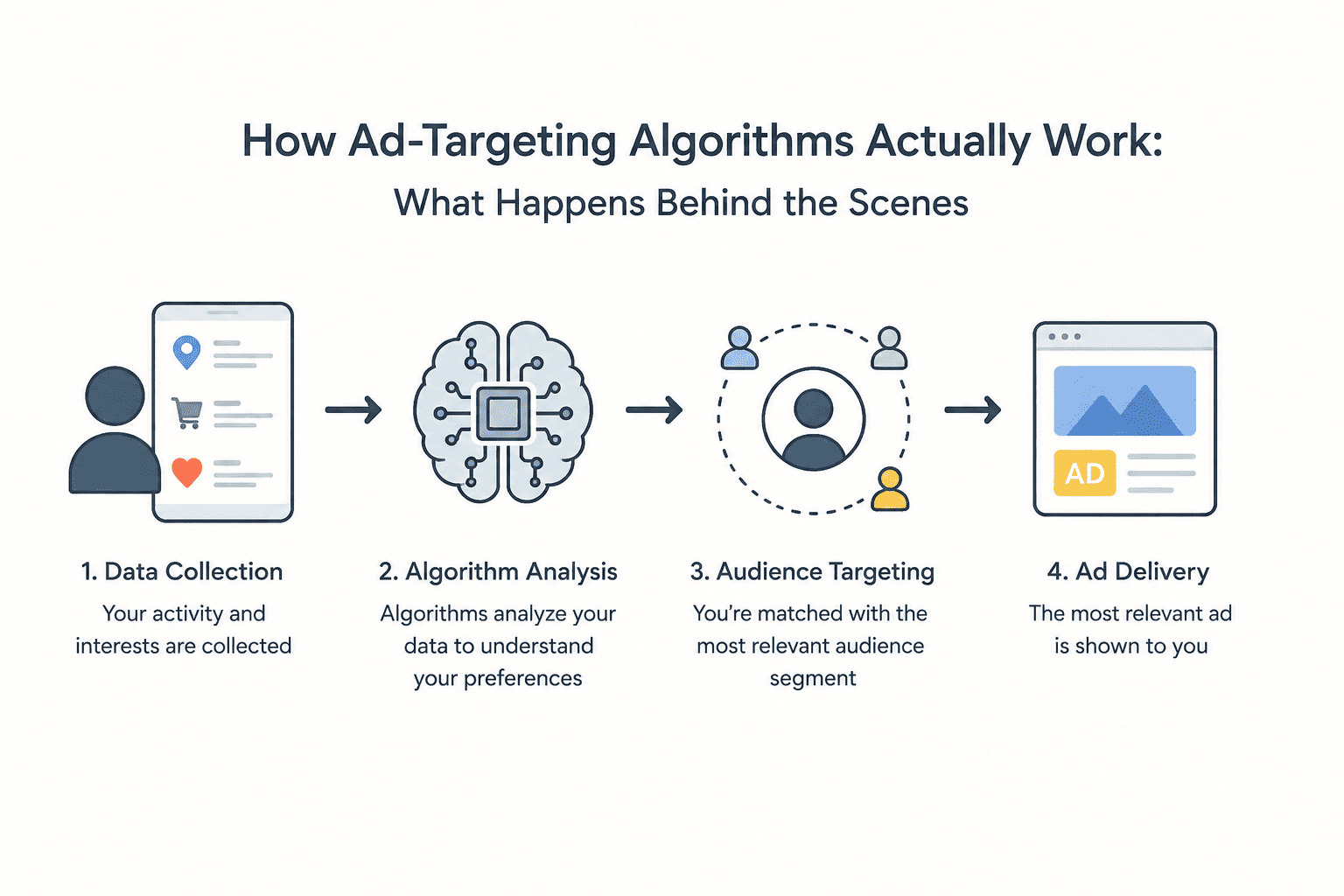
Algorithmic targeting involves the collection of your data via various channels such as cookies, device IDs, web history, mobile apps, and purchasing behavior. Then the algorithm uses the collected information to learn and make predictions regarding your preferences. Advertisers compete through real-time bidding in auctions (usually less than 100 milliseconds) for the opportunity to show you the ad. In other words, the system knows more about your preferences and habits than almost anyone in your life.
You search for running shoes on Monday. On Tuesday you see the advertisements for the shoes on a news website that you have never visited, inside a gaming app on your mobile phone, and in your social media stream. You did not ask for it. You did not give anyone permission to track you on the internet. However, there they are, the ads, accurately targeting your preferences.
And they simply put it down to an abstract “algorithm”. However, what is really going on is much more concrete – and much more invasive – than many people might think. In this article, we learn about the process step-by-step: data collection, the building of a profile of you based on a multitude of different sources, the use of machine learning to predict future actions on your part, and finally, advertisers bidding to display their ads to you within milliseconds.
Have you ever asked yourself whether your phone was listening to you (the short answer would be no, probably not for advertisements, but there is no need to)? This article is going to reveal to you the surprising (and scary) truth about it.
Step 1: The Data Collection — How It All Starts
Before any algorithm can target you, it needs data. The ad-tech industry collects this data through a surprisingly large number of channels, most of which are completely invisible to the average user.
Cookies: The Original Tracking Tool
Cookies are small text files that a website places onto your computer the first time you visit the website. They contain only one thing – the ID, which allows the website and the third party scripts embedded into the website to identify you on the second and further visits. Specifically, third-party cookies are used to make cross-site tracking possible, since one ad network (Google or Meta) can put its cookies on thousands of websites to track user’s behavior on all of them.
If you visited a cooking blog, a tech news website and a shoe store within the same day, a cookie on all of these sites will tell the ad network about what you’ve done and in what order. This information about your behavior pattern is data. And data equals money.
Device Advertising IDs
On smartphones, the equivalent of a cookie is your advertising ID — the IDFA on iPhone and the GAID (Google Advertising ID) on Android. Every app you install can request this ID, and it works the same way a cookie does: it lets ad networks link your behavior across multiple apps into one profile. As we covered in our article on dangerous default phone settings, this identifier is active by default on both platforms and is shared with essentially every app that asks for it.
Pixels and Tracking Scripts
Nowadays, the vast majority of websites load many tracking scripts along with actual content. Thus, a Meta Pixel is a small piece of JavaScript placed on a website that sends a signal to Meta (owner of Facebook) whenever a person lands on the website irrespective of whether this person has an account in Facebook or not. The same thing works in terms of Google Analytics tag, Twitter pixel, TikTok pixel, etc.
These pixels send data such as the fact that a certain person landed on the website, which pages did he or she visit, how long he or she spent there, added something to a shopping cart, bought something, etc. If you have an advertising profile and there is some way to tie this person to that profile, then all this data is attached to it.
Login Data: The Most Accurate Signal of All
When you sign in on Google or Facebook, you give both companies access to the most potent tracking method that exists – an authenticated identity that sticks with you for all eternity. This means that once you have logged in, anything that you do from then on, as well as a lot of what you do when you are logged out, will be associated with your genuine identity. Google will know your Gmail activity, your YouTube browsing history, your trips on Google maps, and your search queries. So does Meta through Facebook, Instagram, WhatsApp, and thousands of other websites.
This is why your browser knows more about you than your doctor does — the data is continuous, unguarded, and collected without the filters that come with a medical consultation.
Where Your Data Comes From: A Full Overview
| Data Source | What It Captures | Who Collects It |
|---|---|---|
| Third-party cookies | Browsing history across sites | Google, ad networks, data brokers |
| Advertising IDs (IDFA/GAID) | Cross-app behavior on mobile | Apple, Google, app developers |
| Tracking pixels | Page visits, purchase events | Meta, TikTok, Twitter/X, advertisers |
| Login / account data | Authenticated identity, email, contacts | Google, Meta, Microsoft |
| Search history | Interests, intent, health queries | Google, Bing, Yahoo |
| Purchase history | What you’ve actually bought | Amazon, retailers, loyalty programs |
| Location data | Where you go, daily patterns | Phone carriers, apps, data brokers |
| Browser fingerprinting | Device identity without cookies | Ad tech firms, analytics providers |
Step 2: Building Your Profile — The Invisible Dossier
Raw data points on their own aren’t useful for targeting. The real power kicks in when thousands of those data points get aggregated into a structured profile. This is where data brokers and demand-side platforms (DSPs) come in.
What Data Brokers Actually Do
Data brokers are organizations that no one even knows about – Acxiom, Experian Marketing Services, LiveRamp, and Oracle Data Cloud – and they work in the shadows of just about every advertisement you come across. The modus operandi of a data broker is straightforward; collect all the data you can from any source, organize it and sell it to advertisers targeting a particular kind of individual.
A broker like Acxiom may hold records on over 2.5 billion people worldwide, with hundreds of data points per individual: estimated income range, number of children, purchasing history, political affiliation, health interests, home ownership status, and much more. None of this requires your explicit consent under most US laws, because most of it comes from public records, loyalty program data sold by retailers, and legal data-sharing arrangements between companies.
Audience Segments: How They Label You
Once your data is aggregated, you get assigned to audience segments — standardized categories that advertisers can target. These segments get surprisingly granular. The Interactive Advertising Bureau (IAB), the standards body for digital advertising, publishes an Audience Taxonomy that runs to thousands of categories. You might be tagged as:
- “In-market for a new vehicle” — because you searched car specs and visited dealership websites
- “Health and wellness enthusiast” — because you read fitness articles and ordered supplements
- “Financially stressed” — because your behavior matches patterns of users who later searched for loan options
- “Parent of young children” — inferred from purchases, search queries, and app usage
- “Likely traveler, Q3” — because you searched flights and hotel rates in the past 30 days
You’re not in one segment. You’re in dozens, possibly hundreds, simultaneously. And each segment has a price advertisers are willing to pay to reach you.
Cross-Device Identity Graphs
This is one of those facts that many consumers do not know: Your advertising profile does not belong only to one particular device. It moves with you no matter what device you use. For example, if you sign in to Google on your cell phone, laptop, and tablet, Google is capable of consolidating the activity on all these devices and creating a unified profile out of it. Even if you do not sign in to your account, companies utilize probabilistic matching — when a laptop and a phone connect from the same IP address and at roughly the same time, they are one and the same — to consolidate devices.
Step 3: The Machine Learning Layer — Prediction Engines
Profile-building is impressive enough. But the part that makes modern ad targeting genuinely uncanny is what comes next: machine learning models that predict your future behavior based on your past behavior.
Lookalike Audiences
Moreover, advertisers do not just aim at users who have previously visited their websites. They load the list of their clients and then ask the platform, Google, Meta, TikTok, and others, to find similar people to their current clients. The algorithm will analyze the things that they all have in common, including demographic factors, content they like, purchase time, the device they use, location patterns, and many other factors. Then, the algorithm will check the general user base and find people who match those factors but haven’t purchased from them yet.
That is why you see advertisements of the products which you did not even think about purchasing, while the product seems familiar to you. That is because you have never been to their website, but the algorithm matched you to their potential customers.
Behavioral Prediction Models
Each and every time you interact on the Internet – click, delay, scrolling past and purchasing – a signal is produced. Companies employ those signals to feed predictive models: neural networks which learn to predict how likely a particular user will be to click on the advertisement, to purchase something or to stop using his/her subscription. Those models get updated in real time due to your interaction with the platform.
It is all about the precision of such models which provide the advantage to the entire industry. For instance, Meta has demonstrated scientific research that the prediction models of conversions of their company can determine which people will be most likely to purchase something based on the advertisement – not thanks to one killer feature, but due to a combination of thousands of weak signals.
Contextual Targeting vs. Behavioral Targeting
It’s worth distinguishing between two types of targeting that are often confused:
- Contextual targeting shows ads based on the content you’re currently reading — a hiking ad on a hiking article. No personal history required. This was the dominant model before behavioral tracking matured.
- Behavioral targeting (also called interest-based targeting) shows ads based on your past behavior across sites and apps, regardless of what you’re currently reading. A hiking ad shown to you while you’re reading a recipe article, because you read five hiking articles last week.
Most modern ad targeting is a blend of both, weighted heavily toward behavioral signals because they’re more predictive of purchase intent.
The Trade-Off: Personalized Ads vs. Your Privacy
✅ Pros of Personalized Advertising
- You sometimes see genuinely useful products you didn’t know existed
- Funds most of the free internet — email, search, social media, news
- Relevant ads are less annoying than completely random ones
- Supports small businesses who can’t afford broad-reach TV advertising
- Can surface deals or promotions aligned with what you’re already shopping for
❌ Cons of Personalized Advertising
- Sensitive data (health, finances, relationships) is used without meaningful consent
- Targeting can be weaponized — manipulative ads during vulnerable moments
- Data profiles are bought by insurance companies, employers, and fraudsters
- Creates filter bubbles that reinforce existing beliefs and limit exposure to new ideas
- Virtually impossible to fully opt out once a profile exists
Step 4: Real-Time Bidding — The Auction That Happens in 100 Milliseconds
Here is the part that might genuinely surprise you: the ad you see when a page loads wasn’t there when the page was built. It was selected for you — specifically — through an auction that completed in less than the time it takes to blink.
How the RTB Auction Works
The moment your browser or app begins loading a page that has an ad slot, a chain of events fires automatically:
- The publisher sends a bid request to an ad exchange (like Google Ad Exchange, OpenX, or AppNexus). The request contains a packet of information about you: your audience segments, estimated location, device type, and often a hashed version of your advertising ID.
- The ad exchange broadcasts the opportunity to dozens or hundreds of demand-side platforms (DSPs) simultaneously. Each DSP represents a pool of advertisers who have set targeting criteria and maximum bids.
- Each DSP evaluates the bid request in milliseconds: does this user match our targeting criteria? If so, what is this impression worth? It consults its own data, the advertiser’s budget rules, and its predictive models.
- Bids are submitted — typically in CPM (cost per thousand impressions) — and the highest bid wins. In most systems it’s a second-price auction: the winner pays the second-highest bid price plus one cent.
- The winning ad is delivered to your device and rendered on screen. The entire process takes 50–100 milliseconds — before your page even finishes loading.
The Federal Trade Commission has studied this real-time bidding ecosystem extensively and raised significant concerns about the amount of sensitive personal data broadcast in bid requests — data that flows to hundreds of companies per page load, most of which the user has never heard of, let alone consented to share data with.
The Difference Between a $0.001 Impression and a $15 One
However, not all impressions cost the same; and the difference is quite large. A generalized impression delivered to a random blog without targeted traffic will be sold for fractions of a penny. Impressions delivered to a known, in-the-market buyer — meaning a person who added a product to his/her shopping cart and hasn’t made the purchase within the next 48 hours – may cost several dollars per impression. The reason why high value audiences, such as lawyers, doctors, or people looking for mortgage loans, have such a high CPM is because the chance for conversions is greater.
That is precisely why your data is valuable; the more specific your identification and matching of your intent, the more valuable an advertiser thinks you are.
The Retargeting Cycle: Why That Ad Won’t Leave You Alone
Retargeting — or remarketing — is the specific technique behind the “haunting shoe ad” phenomenon. Here’s the mechanics of how it works:
- You visit a retailer’s website and browse a product. A cookie or pixel fires and adds you to that retailer’s “site visitors” audience in their ad platform.
- The retailer sets up a retargeting campaign that specifically targets this audience with a bid premium — they’re willing to pay more for you than for a cold prospect, because you’ve already shown intent.
- Every time you visit any page that participates in the same ad network, you appear in the eligible audience for that retailer’s retargeting campaign.
- The ad follows you. For days. Sometimes weeks.
While most advertising platforms offer frequency capping (maximum times you will be shown the same ad) and recency window (where you are only retargeted by the ad if you visited the site 30 days ago), there is no perfect control over this process, which leads to over-exposure of users to the ads.
Retargeting is a hierarchical process: when you just visited the page, you get one type of the ad; when you put the item in your shopping cart but did not purchase anything, you receive another ad – usually it offers you a discount; once you bought something, you are included in the “purchased” list and do not see this particular ad anymore, but rather see cross-selling ads.
What the Algorithm Actually Knows About You — Beyond Shopping
Advertising algorithms were built for commerce, but the profiles they generate extend well beyond purchase intent. Here is what the data infrastructure can reasonably infer about you, even without direct disclosure:
| What the Algorithm Infers | From This Behavior | Used For |
|---|---|---|
| Pregnancy (early-stage) | Vitamin searches, baby product browsing, specific retail patterns | Baby product ads, pregnancy tracking app ads |
| Financial stress | Payday loan searches, budget tool visits, debt content consumption | Predatory financial product ads |
| Health condition | Symptom searches, medication lookups, clinic location visits | Supplement ads, alternative medicine targeting |
| Political lean | News sources visited, social media engagement, donation page visits | Political ads, emotionally manipulative content |
| Relationship status change | Dating app installs, jewelry searches, moving services queries | Engagement rings, dating services, apartment ads |
| Job seeking | LinkedIn activity, resume builder visits, company review site sessions | Recruitment ads, certification course ads |
None of this requires anyone to explicitly tell the algorithm anything. The inferences are drawn automatically from behavioral patterns — the same way a perceptive friend might guess you’re going through something just by noticing small changes in your behavior.
Privacy Regulations: What’s Supposed to Protect You
The ad-tech industry doesn’t operate in a complete legal vacuum. Several frameworks exist to protect users — though their effectiveness varies enormously.
GDPR (Europe)
The EU’s General Data Protection Regulation, in force since 2018, is the world’s most comprehensive data privacy law. It requires explicit, informed consent before personal data can be processed for advertising. It gives users the right to access, correct, and delete their data. It mandates transparency about how data is used. In theory, it fundamentally disrupts the behavioral tracking model described above.
In practice, enforcement has been inconsistent, and the ad-tech industry has invested heavily in consent management platforms (CMPs) that technically comply with GDPR while making it easy for users to click “Accept All” and hard to actually understand what they’re agreeing to. The European Data Protection Board has issued repeated guidance against so-called “dark patterns” in consent interfaces — but the practice continues widely.
CCPA (California)
California’s Consumer Privacy Act gives California residents the right to know what personal data is collected about them, to opt out of the sale of that data, and to request its deletion. It’s a meaningful step forward, but it’s limited to one US state and relies heavily on users actively invoking their rights — which most don’t.
Apple’s ATT Framework
Apple’s App Tracking Transparency (ATT), introduced in iOS 14.5, requires apps to ask for explicit permission before accessing the IDFA for cross-app tracking. When asked, roughly 75–80% of users say no. This has meaningfully disrupted mobile advertising — Meta publicly estimated it cost them approximately $10 billion in revenue in one year — and represents one of the most effective real-world tests of opt-in consent for ad tracking.
How to Actually Protect Yourself From Ad Tracking
You can’t opt out of advertising entirely. But you can significantly reduce how much behavioral data gets collected and used to target you. Here is what actually works, ranked from highest to lowest impact:
1. Disable Your Advertising ID on Your Phone
This is the single highest-impact change you can make on mobile. On Android 12+, you can delete your advertising ID entirely in Settings → Google → Ads. On iPhone, go to Settings → Privacy & Security → Tracking and disable all app tracking requests. For the full step-by-step guide, see our deep dive on the three phone settings you should turn off right now.
2. Use a Browser With Third-Party Cookie Blocking
Firefox blocks third-party cookies by default. Brave blocks them and additionally blocks most tracking scripts and fingerprinting attempts. Safari has Intelligent Tracking Prevention (ITP) built in. Chrome remains the most tracking-permissive major browser, though Google has promised to phase out third-party cookies over the next few years.
3. Install a Content Blocker
uBlock Origin (free, open source) blocks the vast majority of tracking scripts, ad pixels, and fingerprinting code at the browser level. It’s the single most effective browser-based privacy tool available. Combined with a privacy-respecting browser, it eliminates most passive tracking across websites.
4. Use a VPN on Public Networks
A VPN doesn’t stop cookie or fingerprint tracking, but it does hide your real IP address — which is used for location inferences and probabilistic device matching. This is especially important on public Wi-Fi networks. Read our full guide on public Wi-Fi security risks and how hackers steal your data to understand why this matters beyond just ads.
5. Review App Permissions Regularly
Revoke location access from any app that doesn’t genuinely need it. Disable microphone access from apps you don’t use for voice features. Check which apps have access to your contacts — contact data is frequently used for identity matching across platforms.
6. Log Out of Google and Meta When Browsing Casually
Both platforms are dramatically less effective at tracking you when you’re not authenticated. If you use Gmail in one browser profile and browse the web in a separate one, Google cannot link that browsing to your identity as easily.
Alternatives: Privacy-First Tools That Reduce Ad Tracking
| Tool | What It Replaces | Privacy Gain | Free? |
|---|---|---|---|
| Brave Browser | Chrome / Safari | Blocks cookies, trackers, and fingerprinting by default | Yes |
| DuckDuckGo | Google Search | No search history built; no personalized ads from search | Yes |
| uBlock Origin | No browser equivalent | Blocks tracking scripts, pixels, and most fingerprinting | Yes |
| ProtonMail | Gmail | Email not scanned for ad targeting; end-to-end encrypted | Free tier |
| Signal | WhatsApp / Messenger | Messages not available for ad profiling; no data harvesting | Yes |
| Mullvad VPN | ISP tracking | Hides IP address, prevents ISP-based location targeting | Paid (~€5/month) |
⚖️ Final Verdict
Algorithm-based ad targeting is not sorcery, it’s not listening to you through your device microphone; it is much more prosaic, and much more effective – a constantly updating statistical model of your behavior, based on hundreds of data providers you have never agreed with, calculated using machine learning systems that predict your future behavior before you make it consciously, and sold to the highest bidder faster than it takes to load a page.
This model is financing the free internet we use. This is a bargain, but the thing is that it has been made for you by default without your evaluation of its terms, because they were made without clear disclosure at all.
Fortunately, there are some measures you can take to get rid of it. Disabling your ad ID, using a tracker blocker browser and search engine, and auditing your application permissions will take you less than one hour and significantly reduce the size of data feed to your profile. It will not make you invisible, but it will give you a chance to reconsider the bargain that was made for you.
Frequently Asked Questions
Is my phone really listening to my conversations to target ads?
Almost certainly not — at least not for ad targeting purposes. Continuous audio capture would require significant battery power, data transmission, and would likely violate app store policies. The more accurate explanation is that behavioral targeting is precise enough that it feels like listening. If you talked about something and then searched for it (even casually), or if a family member searched for it on a shared IP address, that’s enough. The algorithms are good enough that coincidental matches feel intentional.
What is real-time bidding (RTB) in simple terms?
Real-time bidding is an automated auction system that decides which ad you see when a page loads. The moment your browser requests a page, information about you — your audience segments, device, and location — is broadcast to dozens of advertisers simultaneously. Each one decides what your attention is worth and submits a bid. The whole process takes about 100 milliseconds. The highest bidder’s ad gets shown. You see the result; you never see the auction.
Can advertisers see who I am personally?
In theory, advertisers buy access to audience segments, not to named individuals. In practice, the line is blurrier. If you’re the only user in a very narrow segment — say, a specific ZIP code combined with a rare health interest and a niche product purchase — you’re effectively identifiable even without a name attached. Researchers have repeatedly shown that “anonymous” data can be re-identified with a surprisingly small number of data points.
Does deleting my browsing history stop ad tracking?
Only partially, and only for one source of tracking. Clearing your browser history removes the local record of where you’ve been, but it doesn’t delete the data already collected by third-party trackers, data brokers, or advertising platforms. Your advertising ID on mobile, your browser fingerprint, and your login-based profile all persist regardless of what you clear locally.
Why do I keep seeing ads for something I already bought?
Two reasons. First, there’s often a delay between when you make a purchase and when the advertiser’s system receives the conversion signal — so retargeting continues briefly after purchase. Second, if you bought on one device or channel (in-store, for example) but the advertiser’s system didn’t receive that purchase signal, their retargeting campaign won’t know you’ve already converted and will keep showing you the ad. This is a known frustration in ad tech, and frequency caps are supposed to limit it — but implementation is imperfect.
Is there a way to completely opt out of all ad tracking?
No complete opt-out exists for everyone globally. You can dramatically reduce tracking — to perhaps 20–30% of what happens by default — using the tools described in this article: advertising ID deletion, tracker-blocking browsers, privacy-focused search engines, and a VPN. But some residual targeting will occur based on contextual signals (the content of the page you’re reading) that don’t require any personal data at all. The goal isn’t zero tracking — it’s informed, deliberate control over how much you share.
What’s the difference between first-party and third-party data in advertising?
First-party data is information a company collects directly from you through its own products: your purchase history on Amazon, your search history on Google, your viewing history on Netflix. Third-party data is information collected about you by someone you’ve never directly interacted with — a data broker who assembled a profile from public records, loyalty program data sold by retailers, and tracking pixels on other websites. First-party data is generally more accurate and more valuable; third-party data is broader but noisier. Privacy regulations like GDPR have pushed the industry toward first-party data as third-party cookies face phase-out.
Sources referenced in this article include the Federal Trade Commission’s report on surveillance pricing, the European Data Protection Board, the Acxiom data platform, and the IAB Audience Taxonomy. Internal resources: What Your Browser Knows About You, Dangerous Default Phone Settings, Public WiFi Security Risks.