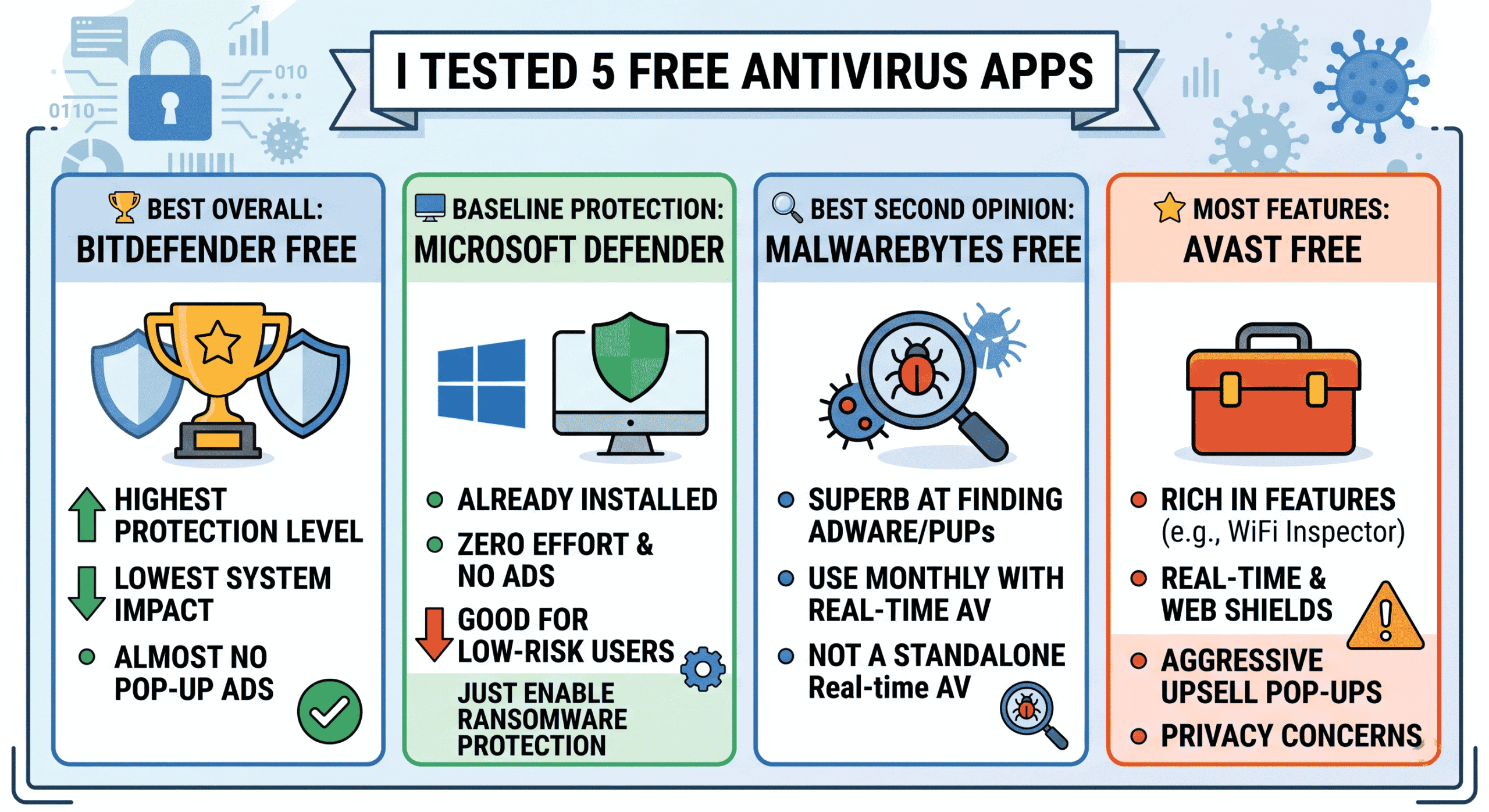
A Quick Answer: After testing five free antivirus programs on an actual Windows 11 device throughout an entire weekend, Bitdefender Free took the cake for the highest level of protection and lowest system impact. If you can endure the upsell pop-ups, Avast Free will provide the most features out of all tested. Windows Defender is the honest baseline program that everyone has but doesn’t know.
To put things straight, I did not expect to spend my whole Saturday testing different antivirus programs. However, after my friend complained about getting her laptop infected with some adware because of a “free PDF converter,” I started thinking whether free antivirus programs are worth using in 2026, or they are nothing more than ad machines.
Therefore, I picked a mid-range Windows 11 laptop (Intel Core i5, 8GB RAM – something everyone can afford) and went through a whole weekend of stress testing five of the most used free antivirus apps. I considered their performance, ability to detect viruses, impact on the computer’s performance, and, of course, amount of pop-up advertisements about other paid software.
Here are all the results.
Why Free Antivirus Is Still Worth Talking About
Before we get into the individual apps, let me address the elephant in the room: do you even need third-party antivirus if you’re on Windows?
Windows Defender (now called Microsoft Defender Antivirus) has gotten genuinely good. According to AV-TEST’s independent lab results, Defender consistently scores well in protection categories. But “genuinely good” isn’t the same as “best available,” especially if you’re dealing with phishing links, ransomware, or sketchy downloads.
Third party antivirus software offers its users free services in the form of additional layers of protection such as advanced web filtering capabilities, behavior detection and in some cases even provide you with a virtual private network. However, the downside to most of these services is that they are either supported by data mining or advertising.
Also worth knowing: free antivirus is only one layer of your security setup. If you want to understand how attackers actually get in before any software can stop them, read our guide on how phishing emails trick you — because the best antivirus in the world won’t save you if you click the wrong link.
The 5 Free Antivirus Apps I Tested — At a Glance
| App | Protection Score | System Impact | Upsell Annoyance | Best For |
|---|---|---|---|---|
| Bitdefender Free | ⭐⭐⭐⭐⭐ | Very Low | Low | Set-and-forget protection |
| Avast Free | ⭐⭐⭐⭐½ | Medium | High | Feature seekers on a budget |
| Malwarebytes Free | ⭐⭐⭐⭐ | Low (no real-time) | Medium | Second-opinion scanner |
| AVG AntiVirus Free | ⭐⭐⭐⭐ | Medium-High | High | Familiar interface users |
| Microsoft Defender | ⭐⭐⭐⭐ | Low | None | Baseline protection, zero effort |
1. Bitdefender Free Antivirus — The One I Still Have Installed
Without wasting much time, the winner here is clearly Bitdefender Free Antivirus. It doesn’t even come close.
The installation process takes only about four minutes. There is no preloaded junk, no browser toolbar imposed, and, apart from initial configuration, it pretty much goes invisible. I kept running CPU/RAM monitors for two hours of typical usage (web browsing, watching videos on YouTube, basic document manipulation), and the maximum Bitdefender CPU consumption was 1%.
In terms of features, all of the protection is cloud-based, meaning that the bulk of work is done by Bitdefender’s system on its own servers, rather than being thrown at your PC. This is, in fact, the good design solution because the database of the threats is always up-to-date without any bulky updates locally.
So, what is not there? A lot, actually. No VPN service, no password manager, no web filtering interface, no task scheduling. All of the features of the free edition are reduced to just one — real-time protection.
✅ Pros
- Excellent malware detection rates (consistently top-ranked in AV-Comparatives independent tests)
- Extremely low system footprint — you won’t feel it running
- Almost no upsell popups compared to competitors
- Cloud-based scanning means always-current definitions
❌ Cons
- Very limited UI and manual controls
- No web browser protection on the free tier
- Requires an account to activate
Verdict: Best overall free antivirus. Install it, forget about it, and let it run. If you just want solid background protection without thinking about it, this is your answer.
2. Avast Free Antivirus — Feature-Rich but Exhausting
It has existed for decades already, and its free version is better equipped with features than some paid rivals. At least, on the face of it, it seems excellent. However, in reality, it forced me to get rid of three upsell pop-ups within the first twenty minutes of using it.
At least, in terms of the basic protection, Avast is really good. It has a real-time shield, a web shield that truly prevents any dangerous websites from being opened, an email scanner, and a WiFi Inspector that tests the security of the used network. The latter one is rather helpful because it detected that the router I use has WPA2 with a weak key.
The privacy angle is worth mentioning. Avast has had documented issues with selling user browsing data, resulting in an FTC enforcement action in 2026. They’ve since updated their data policies, but it’s something you should factor in if privacy is a concern for you. If that matters to you, also check out our article on the real dangers of using public Wi-Fi — Avast’s Wi-Fi scanner doesn’t replace proper network hygiene.
✅ Pros
- Web shield that blocks malicious URLs in real time
- Wi-Fi network scanner — actually useful
- Behavioral detection catches zero-day threats better than some rivals
- Polished interface, easy to navigate
❌ Cons
- Aggressive upsell popups and banners throughout the UI
- Historical data privacy concerns (see FTC link above)
- Higher RAM usage than Bitdefender or Defender
- Installation pushes Google Chrome and other extras if you click too fast
Verdict: Good protection, but the trade-offs are real. Fine for users who want extra features and don’t mind the nag screens. If privacy matters to you, look elsewhere.
3. Malwarebytes Free — The Best Second Opinion Scanner
What took some time for me to understand about Malwarebytes Free was that it was not actually an antivirus software program. In other words, the program does not operate in real-time mode, which is a disadvantage of its free edition.
However, Malwarebytes is excellent at the job it performs – detecting malicious objects that other software products do not detect, such as adware, potentially unwanted programs, and spyware. Having used it after scanning with Bitdefender on the same computer, I found out that there was a cluster of tracking cookies and a dormant adware package installed with one of the software products some months ago.
The detection engine of Malwarebytes is superb. However, its weakness lies in the fact that it cannot protect the computer from getting infected since it works in on-demand mode.
So, here is my suggestion: use Malwarebytes along with other protective software such as Windows Defender or Bitdefender Free; run the scan using Malwarebytes whenever something seems suspicious to you. The software is free, it works rather quickly and is the best cleanup solution.
✅ Pros
- Outstanding at finding adware and PUPs other tools miss
- Very light — only active when you run it
- Clean, no-nonsense interface
- Trusted by IT professionals as a second-opinion scanner
❌ Cons
- No real-time protection on the free version
- Not a complete replacement for a traditional antivirus
- 14-day trial of Premium starts automatically, then you lose features when it expires
Verdict: Not a standalone solution, but the best cleanup and scanning tool available for free. Run it alongside your main antivirus for best results.
4. AVG AntiVirus Free — Avast’s Slightly Quieter Twin
Here’s an interesting fact that many do not know: AVG is made by Avast. Both use the same core engine. The only difference in these two software is the way the company markets it, as well as the looks and style.
AVG has a marginal advantage over Avast in terms of upselling. Its interface is slightly better than that of Avast and uses the same engine, hence has the same reputation and the same detection levels.
In the course of testing, AVG used more memory than Bitdefender, around 280MB compared to Bitdefender’s ~90MB. This would become a problem for old computers or any computer that has less than 8GB of memory.
On the bright side, AVG has something good to offer, namely the file shredder and the performance tuning. Both are useful features.
✅ Pros
- Same strong engine as Avast, slightly fewer popup ads
- Includes a useful file shredder and PC optimizer
- Straightforward install process
❌ Cons
- High RAM usage compared to competitors
- Still shares Avast’s data privacy concerns
- No meaningful difference from Avast unless you prefer the UI
Verdict: Solid but not special. If you already like Avast, you’ll be fine with AVG. If you’re choosing from scratch, Bitdefender is the smarter pick.
5. Microsoft Defender — Underrated and Already on Your Machine
I almost excluded Defender from my testing because it’s built into Windows, and this is somehow cheating. However, I shouldn’t do that precisely for this reason. This software is used by millions of people, and they even don’t know about it!
The results of Defender were quite surprising. It became very powerful in the meantime and, in some independent tests, showed comparable results to paid mid-tier products. The software is integrated into Windows Security, gets automatic updates via Windows Update, and requires no additional resources besides those required by the OS itself.
The real cons of this software are poor phishing protection in comparison with Avast, mandatory ransomware folder protection (it’s disabled by default — Windows Security > Virus & Threat Protection > Ransomware Protection), and lack of complex behavioral analysis similar to Bitdefender’s cloud engine.
But for someone who isn’t downloading sketchy software and already practices basic digital hygiene — like being careful about login alert emails (check our piece on why acting on login alerts matters) — Defender plus some common sense is genuinely enough.
✅ Pros
- Already installed — zero setup required
- Zero extra system overhead
- No privacy concerns, no upsells, no data collection
- Automatically updated through Windows Update
- Built-in ransomware folder protection (once you enable it)
❌ Cons
- Phishing link detection is weaker than third-party options
- Ransomware protection is off by default — confusing for casual users
- No browser extension or network scanner
Verdict: Better than most people think. If you’re low-risk and practice basic digital hygiene, Defender is completely sufficient. Pair it with a Malwarebytes scan once a month and you’re covered.
What I Actually Use After All This Testing
I ended up with a two-layer setup: Bitdefender Free as my main always-on protection, and Malwarebytes Free for monthly manual scans. Total cost: $0. Total system impact: barely noticeable.
In this way, I get the great real-time detection capabilities of Bitdefender along with the PUPs detection features of Malwarebytes, which Bitdefender may not pay as much attention to.
As for someone who is less technical and needs the easiest solution without any configuration effort: using Windows Defender along with ransomware folder protection is all it takes.
What If None of These Work for You?
A few alternatives worth knowing about:
- Kaspersky Free: Strong protection ratings, but given the company’s Russian origins and CISA security advisories around it, many security professionals now recommend avoiding it for sensitive systems.
- Sophos Home Free: Excellent option for families — allows remote management of up to three devices. The interface is clean and the protection is top-tier.
- Panda Free Antivirus: Lightweight and includes a free VPN (limited to 150MB/day). Good for older hardware where system impact matters most.
Frequently Asked Questions
Is free antivirus actually good enough in 2026?
In the case of ordinary people, yes — assuming you couple a fine free solution such as Bitdefender with some good practices (such as avoiding suspicious web links, updating your Windows, and not downloading any illegal programs). The difference between free and premium antivirus products is not much nowadays.
Can I run two antivirus apps at the same time?
Two real-time scanners at once will not be possible because it will cause conflicts that might trigger false alarms and reduce the speed of your computer. However, you can have only one real-time scanner together with Malwarebytes Free.
Does antivirus slow down your computer?
This is determined by which one you use. Bitdefender Free has virtually no effect. AVG and Avast are more resource-intensive. Windows Defender is completely free as far as resources go because it is part of the system already. If your computer becomes slower with an antivirus program installed, blame the antivirus.
What’s the biggest threat free antivirus can’t protect you from?
You. Attacks through social engineering such as phishing, tech support calls that aren’t legitimate and download pages which trick you into taking actions are not thwarted by antivirus systems since you have taken the first step to start the attack process. There’s no way that software can prevent you from giving away your password willingly.
Should I pay for antivirus?
Not likely for the average home user, who is only concerned with basics. This is because the paid tiers offer users such services like the VPN, password manager, parental controls and priority support; these may be very useful, but certainly do not affect security in any way.
Which free antivirus is best for an old laptop?
Bitdefender Free or Windows Defender. Both have minimal RAM and CPU footprint. Avoid Avast and AVG on anything older or with less than 4GB RAM — they’ll make the machine feel sluggish.
🏆 Final Verdict
Best overall: Bitdefender Free — excellent protection, lightest footprint, least annoying to live with.
Best second-opinion scanner: Malwarebytes Free — pair it with any of the above for monthly cleanup scans.
Best zero-effort option: Microsoft Defender (already installed on Windows — just enable ransomware protection).
Best for extra features: Avast Free — but read up on their data privacy history before you commit.
Skip if: You’re on older hardware or value privacy — AVG and Avast are resource-heavy and have documented data concerns.
In conclusion: there is no deception in free antivirus software. The best will actually do their job. The rest will simply sell your data instead of taking your money. Differentiating between them and choosing the correct one – this is all that I have spent this entire weekend discovering.
Stay safe out there.