Have you ever wondered exactly what your browser knows about you? Short Answer: The browser is constantly tracking your whereabouts, your searches, questions related to your health…
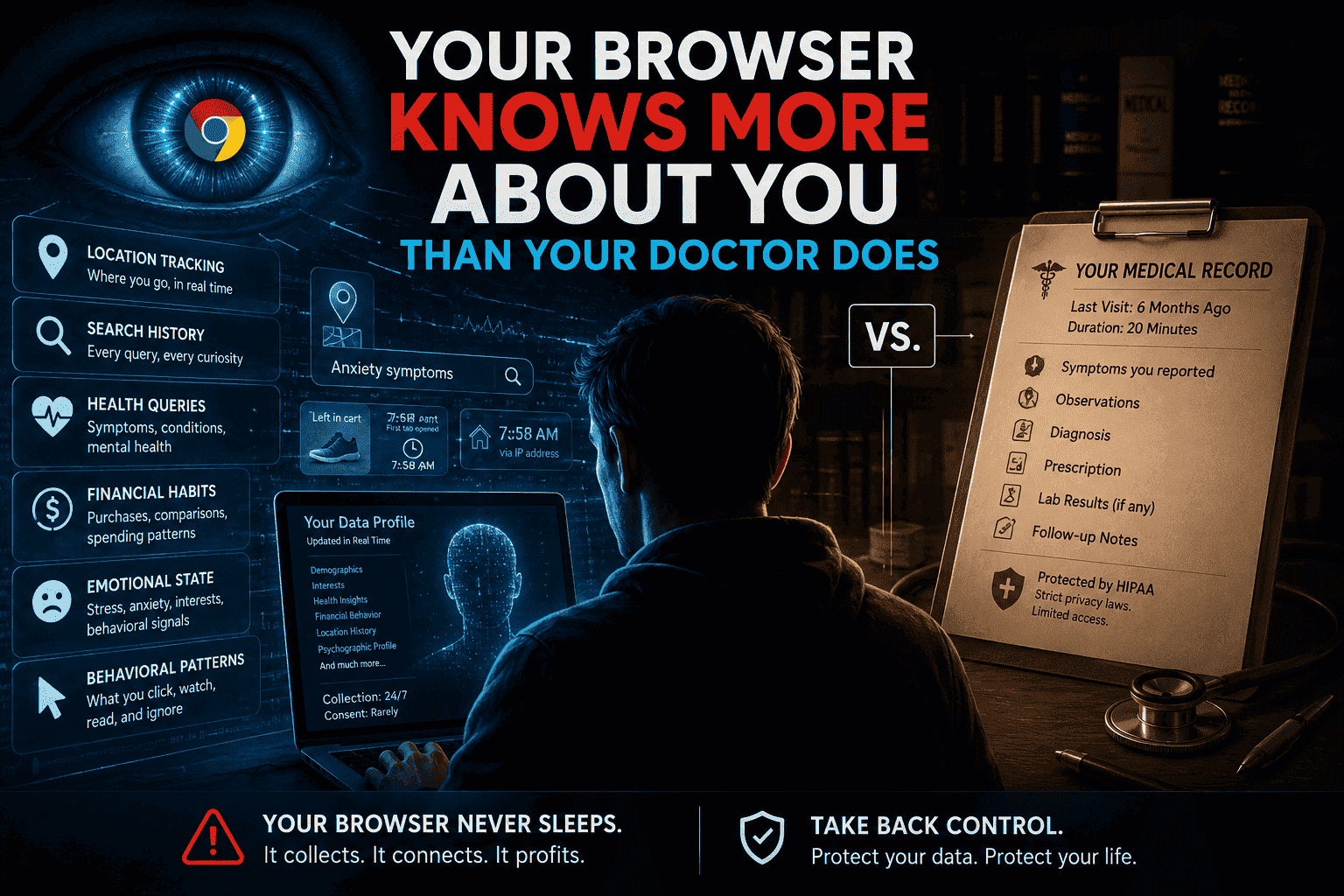
The Short Answer The browser is constantly tracking your whereabouts, your searches, questions related to your health, your financial behavior, your emotional state, and your behavioral tendencies – usually in real time. Contrary to your doctor who meets you a couple of times a year and is required to keep strict medical confidentiality (e.g., HIPAA), the browser is collecting data on you all the time without any significant restrictions. The consequence is the creation of a commercial data portrait which is more comprehensive than your medical file.
Consider your last visit to your general practitioner. You had to respond to some questions, describe your symptoms, and leave after receiving the prescription or the referral. The consultation lasted for about 20 minutes. Your GP entered some data points into the file.
Now consider the data points collected by your browser today.
Your wake-up time was recorded accurately based on the time you first accessed any tab, the things you were searching for before having your breakfast, how much time you spent reading about anxiety, the items you intended to buy but never purchased, the neighborhood you belong to according to your IP address, and the emotion embedded into your queries. It did all of this without seeking any permission from you, automatically and secretly.
This is no paranoia, just the current state of affairs in the world of the modern internet, which poses many concerns regarding your privacy, autonomy, and safety. We will discuss in detail what does your browser know about you, why it knows more than your medical record, and what you can do to solve this issue.
What Your Doctor Actually Knows About You
The time when you woke up has been logged precisely by the time you have visited any tab, the search queries that you were making before having breakfast, the amount of time you spent reading about anxiety, the things that you wanted to buy but didn’t buy, your neighborhood on the basis of your IP address, and the emotions embedded in your queries. All of this was done without asking for your consent.
There’s no paranoia in saying that, but it is just the reality of the world today where the internet raises numerous issues about your privacy, freedom, and security. Let’s take a detailed look at what your browser knows about you, why it knows more about you than your medical records, and what can be done in this regard.
Medical data is powerful — but it is also narrow, episodic, and legally protected.
The Three Big Limits of Medical Records
- Infrequent snapshots: Data is collected only during visits, not continuously.
- Self-reported bias: Patients often omit embarrassing or sensitive details.
- Strong legal guardrails: HIPAA, GDPR (for EU residents), and similar laws restrict access and commercialization.
Your browser faces none of these limits.
What Your Browser Actually Knows About You
This is where things get truly scary. Your browser — along with hundreds of other tracking companies that tag along wherever you go on the Internet — gathers information about all aspects of your life. Not just your clicks. Not just your purchases. Everything.
The Full Surveillance Stack
| Data Category | What’s Being Collected | Why It’s Sensitive |
|---|---|---|
| Health & Medical | Symptom searches, medication lookups, mental health queries, fertility tracking | Reveals conditions you’ve never told a doctor |
| Financial | Income signals, loan searches, debt consolidation clicks, shopping cart abandonment | More granular than a credit report |
| Location | Home, work, places of worship, clinics visited, late-night locations | Can infer religion, relationships, lifestyle |
| Emotional State | Search cadence, news topics consumed, time spent on crisis-related content | Predicts depression, anxiety, stress better than self-reports |
| Political & Religious Views | News sources visited, donation pages, event registrations | Can be used for manipulation or discrimination |
| Relationships | Dating site activity, social media connections, communication patterns | Exposes relationship status, sexual orientation, family dynamics |
| Biometric Signals | Typing speed, mouse movement, device orientation, touch pressure | Can detect neurological conditions, stress, intoxication |
And this information is not confined to a single location. It is combined, compared to information collected by other applications and services, sold to data brokers, and analyzed using machine learning algorithms that draw conclusions about you – conclusions that may be even more accurate than those in your medical file.
According to the Electronic Frontier Foundation, your browser can be identified with alarming precision through a process called browser fingerprinting — even if you use incognito mode, clear your cookies, or switch IP addresses. Want to understand how fingerprinting works in detail? Check out our guide to browser fingerprinting for a full breakdown.
Browser Data vs. Medical Data: A Side-by-Side Comparison
| Factor | 🏥 Your Doctor’s Records | 🌐 Your Browser’s Data |
|---|---|---|
| Frequency of data collection | A few times a year | Every second you’re online |
| Depth of personal insight | Medical history, prescriptions | Fears, desires, relationships, finances, health |
| Legal protections | HIPAA, GDPR, strict access controls | Mostly self-regulated, minimal enforcement |
| Who can access it | Healthcare providers, with consent | Hundreds of ad-tech firms, data brokers, governments |
| Your right to delete | Limited, formal process | Technically possible, practically very difficult |
| Predictive capability | Clinical diagnoses only | Predicts behavior, mental state, future purchases, health risks |
| Emotional filter | You decide what to share | No filter — raw, unguarded behavior is recorded |
The difference is that you act for the benefit of your doctor. You prepare, you edit, you censor yourself. The internet stores you in all your nakedness — at 2am, when you’re afraid, when you’re grieving, when you’re looking for things you’d never speak aloud.
The Specific Ways Browsers Outpace Medical Records
1. Mental Health Profiling Without a Therapist
A 2022 study cited by the Pew Research Center found that 79% of Americans are concerned about how companies use their data — yet most have no idea how detailed the behavioral profiling has become. Advertisers can infer depression from the types of articles you read, the time of night you browse, and how frequently your browsing shifts from productivity to passive scrolling. No psychiatrist appointment required.
2. Pregnancy Detection Before You Tell Anyone
This is not hypothetical. It became public knowledge when a major retailer’s algorithm detected a teenager’s pregnancy from her search and purchasing behavior before her family knew. Your browser doesn’t just observe your life — it predicts it. For more on how algorithms learn from your data, see our article on how ad-targeting algorithms actually work.
3. Financial Stress Assessment
Together, searching for “how to delay rent payment,” clicking on payday loan advertisements, and browsing through debt relief websites constitute a highly detailed picture of your finances that is far more detailed than any kept by your bank or even your physician. And this information is being used, but not in the way you might expect.
4. Geolocation as a Medical Inference Engine
Should the device place you in an oncology office for three consecutive Tuesdays, the data brokers will be able to deduce that you have been diagnosed with cancer. Should you attend appointments at a mental health center, a methadone treatment facility, or a provider of abortions, then all this information, which is not legally protected, will be available to all interested parties.
The Federal Trade Commission (FTC) has repeatedly warned about data broker practices that use location data to infer sensitive health information, but enforcement remains limited.
5. Browser Fingerprinting: The Cookie That Never Clears
Even if you delete every cookie and use a VPN, your browser still broadcasts a unique fingerprint — a combination of your screen resolution, installed fonts, GPU rendering output, timezone, language settings, and dozens of other micro-signals. Companies use this to re-identify you across sessions. Unlike cookies, you cannot delete your fingerprint. You can only obscure it — which is exactly what tools like the Firefox browser with enhanced tracking protection attempts to do.
Why This Actually Matters (Beyond Privacy)
Privacy advocates often struggle to communicate urgency because “data collection” sounds abstract. Here is what it translates to in practice:
- Insurance discrimination: Health and life insurers can purchase data profiles that predict your risk — and price accordingly — without you ever knowing.
- Employment screening: Background check services increasingly incorporate behavioral data from web activity.
- Political manipulation: Your psychological profile, built from browsing history, can be used to serve you precisely targeted political messaging designed to push emotional buttons.
- Stalking and domestic abuse: Location and behavioral data sold by data brokers has been directly used to track and harm individuals, as documented by the FTC.
- Medical misinformation targeting: If you search for cancer treatments, you may be served ads for expensive, unproven alternative therapies by companies that know you are vulnerable.
This is not a future risk. All of these harms are happening right now, documented by researchers, journalists, and government agencies.
The Legal Gap That Makes This Possible
Medical information is covered by HIPAA. In the vast majority of the world, browser data is not protected – or at best, is inadequately so.
HIPAA covers healthcare providers, insurance companies, and their business partners. It does not cover a search engine which learns about your diabetes through your search history. It does not cover an advertisement system that knows about your visits to mental health sites. It does not cover a data broker which infers that you are pregnant through your purchasing behavior.
GDPR, Europe’s regulation on data privacy, offers much stronger protection, requiring consent and offering citizens the right to access, modify, and delete their data. Nevertheless, its enforcement is inconsistent, and the ad-tech industry has spent the last decade designing technical solutions that adhere to the letter but not the spirit of the regulation. The CCPA, the Californian consumer privacy act, gives US citizens living there some control over their information. It is still exceptional.
In summary: the most sensitive and personal data about you is covered by an inconsistent combination of terms of service and out-of-date regulations.
The Trade-Off: What You Get vs. What You Give Up
✅ What Personalized Browsing and Tracking Gives You
- More relevant search results and product recommendations
- Free access to email, social media, maps, and news
- Personalized health information that can sometimes point you toward the right care
- Convenience features like saved passwords, autofill, and seamless login across devices
- Security tools that detect unusual login behavior using your patterns
❌ What You Actually Give Up
- The ability to search privately for embarrassing or sensitive information
- Control over how your health, financial, and emotional data is used commercially
- Protection from manipulative targeting during vulnerable moments
- The right to be forgotten — deleted data rarely disappears from all downstream recipients
- Peace of mind that your most intimate thoughts (expressed as searches) are your own
What You Can Actually Do About It
The good news: you are not completely powerless. A layered approach to browser privacy — combining better tools, habits, and settings — can significantly reduce your exposure. For a full walkthrough, see our complete browser privacy guide.
Priority Actions (Start Here)
- Switch to a privacy-focused browser: Firefox with uBlock Origin, or Brave Browser, block most third-party trackers by default. Chrome, despite Google’s promises, remains deeply embedded in the ad-tech ecosystem.
- Use a reputable search engine that doesn’t track you: DuckDuckGo, Startpage, and Brave Search do not build personal profiles based on your queries.
- Install a content blocker: uBlock Origin (free, open source) blocks the vast majority of trackers and fingerprinting scripts. It is one of the most effective single-step privacy improvements you can make.
- Review app permissions on mobile: Browser-based tracking is amplified by app tracking on phones. Revoke location, microphone, and contact access from apps that do not need them.
- Opt out of data broker profiles: Services like DeleteMe or manual opt-outs at major data brokers (Acxiom, LexisNexis, Spokeo) can reduce your commercial data footprint.
- Use a VPN thoughtfully: A VPN masks your IP address and location, but does not stop fingerprinting or cookie-based tracking. It is one layer, not a complete solution. Read our analysis of common VPN privacy myths before committing to one.
Advanced Options for High-Risk Users
- Use Tor Browser for searches involving sensitive medical, legal, or personal topics — it routes traffic through multiple nodes, defeating fingerprinting.
- Consider compartmentalization: use different browsers for different activity types (work, personal research, sensitive queries).
- Use temporary email addresses and aliases when signing up for services to limit cross-platform data linking.
⚖️ Final Verdict
The browsing software knows more about you than your doctor – indeed, it knows more about you than anybody else in the world, even you. And it is not only the quantity but the quality of the information known that is different; it is the unguarded, unfiltered, constant nature of that information, and its commercial exploitation.
Health-related privacy laws came to fruition in response to the realization that the health data is particularly sensitive and needs protection. We have yet to reach such a realization in regards to browser data, and now it not only includes health-related data but far exceeds it.
In the absence of legislation, it is on us to take action and protect ourselves. This may be an unsatisfactory conclusion; after all, it shouldn’t be your task to outwit a multi-billion dollar industry, but at the moment it’s the best we can do.
Our evaluation of the present condition of browser privacy: 2/10.
Frequently Asked Questions
Does incognito mode protect my privacy?
No – not from the sites or tracking scripts. Using incognito mode stops your web browser from storing your browsing history, cookies, and form data for the session. However, the sites that you visit, your ISP, and any other tracking scripts placed on these sites will still be able to see what you are doing. Your IP address and browser fingerprint are still visible. Incognito mode is helpful in making sure that your browsing is not stored on your own device.
Is browser data actually used for health insurance decisions?
In the USA, the Health Insurance Portability and Accountability Act (HIPAA) prevents the traditional health insurers from relying on non-medical information for underwriting purposes – in theory. In reality, there is an extensive market of profile selling by data brokers that infers health information. There are examples when insurers used behavioral and financial information for their underwriting.
What is browser fingerprinting and can I stop it?
Browser fingerprinting is the process of identifying your browser (and by extension, you) by combining dozens of technical signals — your screen size, installed fonts, time zone, GPU capabilities, browser version, and more. Together, these create a near-unique identifier that persists across sessions even without cookies. You can reduce fingerprint uniqueness by using Tor Browser or Firefox with Resist Fingerprinting enabled, but it is very difficult to eliminate entirely. Learn more in our dedicated browser fingerprinting explainer.
Does using a VPN fully protect my online privacy?
Not at all. A virtual private network (VPN ) helps in encrypting the traffic, and conceals your IP address from any website, which is definitely useful. However, using a virtual private network will not stop tracking through cookies, browser fingerprints, and even through the logins made on Google and Facebook accounts, as these social networking sites track anyone using their service.
Are there laws being passed to fix this?
There are several efforts under way. The most comprehensive existing legal framework is the GDPR, developed by the European Union. In the USA, the California Consumer Privacy Act (CCPA) and some federal privacy bill initiatives are already underway, though all still need to be codified into law. The ADPPA has received attention from Congress, but it still hasn’t moved anywhere.
What is the single most effective privacy step I can take right now?
Get uBlock Origin for your browser right away. It is open source and free, and it blocks almost all third-party trackers, scripts, and browser fingerprinting tools on the internet. Combine this with changing your default search engine to DuckDuckGo. Just these two things alone get rid of a big chunk of passive browser spying with no loss in browser experience.
Does deleting my cookies protect me?
Partially. By deleting cookies, stored IDs are wiped out, making it impossible for trackers to identify you using cookies. However, most trackers will be able to re-establish your identity after a couple of sessions through fingerprinting techniques. It is good practice to regularly delete cookies; however, doing so alone will not suffice.
Last updated: June 2026. External sources referenced include the U.S. Department of Health & Human Services (HIPAA), the Electronic Frontier Foundation, the Federal Trade Commission, Pew Research Center, and Mozilla Foundation.